
Getting started
 Read more »
Got a question? We’ll take you to the best answer.
Read more »
Pro customers receive priority support.
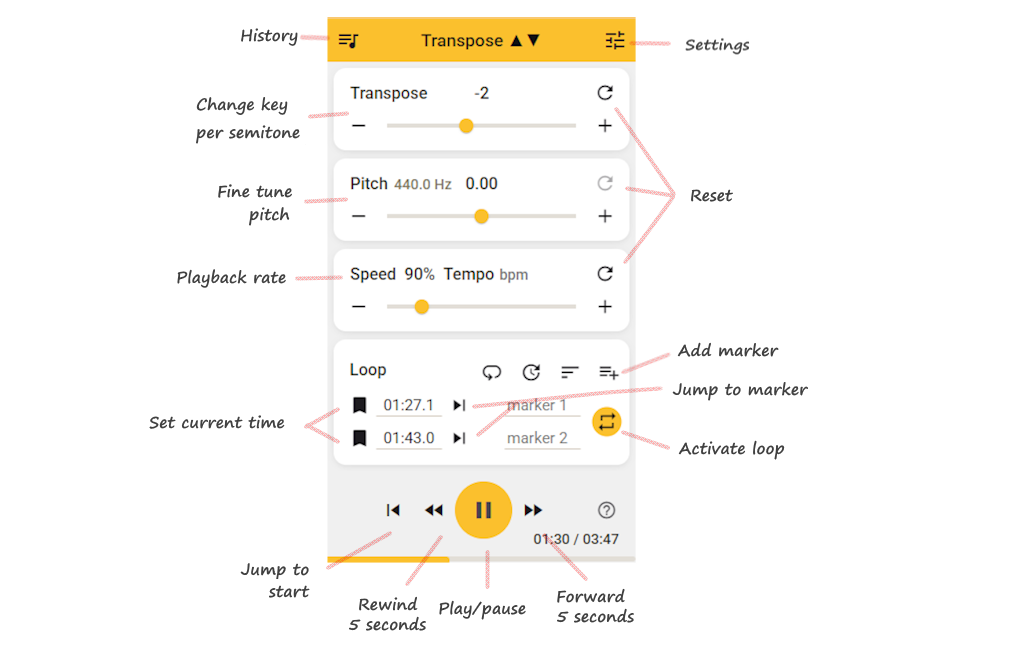
"# Getting started\n<!-- id:getting-started -->\n\n`Free` `Pro`\n1. Install the extension in Chrome (Pro) or Chrome/Edge (Classic Free).\n2. Open a video page (e.g. YouTube).\n3. Open the extension from your browser toolbar.\n\n\n\n**If it doesn’t start immediately**\n- Refresh the page.\n- Start playback before opening the extension.\n- Ensure your browser is up to date (latest Chrome/Edge). \n\n> Free: Works on desktop Chrome, Edge, and most Chromium-based browsers.<br/>\n\n> Pro: Available only in Google Chrome on desktop.\n\n<tags>getting started, install, setup</tags>\n\n---\n\n# Where can I find the extension?\n\n`Free` `Pro`\n\nAfter installation:\n1. Open Chrome or Edge.\n2. Click the puzzle-piece icon (Extensions) in the toolbar.\n3. Pin Transpose to keep it visible.\n4. Click the Transpose ▲▼ icon to open it.\n\n\n\n<tags>install, pin, toolbar, find extension</tags>\n\n---\n\n# Is it free to use?\n\n<!-- id:is-it-free -->\n\n`Free` `Pro`\n\nYes. **Transpose Classic** is free and will remain free forever. \n\nOur Mission: **Encouraging Music Making**\n\nWe believe that making music is for everyone. That's why the core of Transpose is a powerful, free tool for your daily practice sessions. It is our contribution to the music community, to help as many people as possible grow and enjoy playing.\n\nThe Classic version contains all the features from the original extension, which we've been improving since 2017.\n- Works on YouTube, Spotify, SoundCloud, Deezer, and many more.\n- Includes pitch, speed, and loop control.\n- Keeps track of your recent history song settings\n- Saved playlists/lists are Pro-only.\n\n**Transpose Pro** is a new, optional upgrade. \n\nIt adds an improved pitch algorithm, plus extra features like formant control, vocal reducer, advanced loops, clips, and saved songs. \n\nUpgrading is not required. Classic users keep the same free experience they always had.\n\n<tags>pricing, cost, free, pro, classic, upgrade</tags>\n\n---\n\n# What is Transpose Pro?\n\n<!-- id:pro-what -->\n\n`Pro` `Features`\n\nTranspose Pro is the next step after **Transpose Classic (Free)**. \n\nClassic already includes all the functionality of the old one-time-payment Pro — nothing has been removed. \n\nThe new Pro is a **premium upgrade** on top of Classic, designed for musicians who want higher quality, more precision, and advanced practice tools. \n\n**Classic (Free) includes:**\n- Pitch shift ±12 semitones & fine-tune\n- Speed control from 25% to 400%\n- Unlimited loops\n- Works on YouTube, Spotify, SoundCloud, Deezer, local files & more\n- No account required\n- No ads \n\n**Pro adds all of this on top:**\n- **Premium high-quality, low-latency pitch shifter** \n - More natural sound, less delay, fewer clicks and artifacts\n- **Formant control** — change timbre/voice color without changing pitch\n- **Vocal Reducer** — lower centered vocals in stereo mixes\n- **Advanced looping** with: \n - High-resolution timeline and draggable markers \n - Wait-in counts {{icon:update}}, laps, and more accurate playback \n - Scrubbing preview when paused\n- **Clips & sequences** \n - Save fragments with their own pitch, speed, formant, and vocal reducer settings \n - Chain clips into practice sequences (e.g. slow → medium → original tempo)\n- **Efficient looping station** — rehearse with multiple markers and loop ranges\n- **Save your work in the cloud** \n - Clips, sequences, saved songs, and playlists sync across your signed-in desktop Chrome browsers\n- **Custom keyboard shortcuts** for faster control\n- **Varispeed** — links pitch and speed for natural tape-style feel\n- **Reference Tuning** — match non-standard or historical tuning standards\n- **Low Latency mode** — minimize audio delay for instrument-following drills\n- **Side panel UI** {{icon:view_sidebar|material-symbols-outlined}} \n - Always on top, no popup interruptions \n - Easier access to all Pro features\n- **Volume slider & Power toggle** {{icon:power_settings_new}} for quick control \n\n> Free: Works on desktop Chrome, Edge, and most Chromium-based browsers.<br/>\n\n> Pro: Available only in Google Chrome on desktop.\n\n**Summary:**\n- Classic (Free) = everything you know and already use, forever free.\n- Pro = optional upgrade with **better sound quality, less delay, and powerful new tools** for practice and rehearsal. \n\n👉 Upgrading is never required — but if you want the best experience, Pro is for you.\n\n<tags>pro, features, classic, free, upgrade, pitch, speed, loop, formant, vocal reducer, clips, songs, playlists, sync</tags>\n\n---\n\n# Can I use Transpose on multiple devices?\n\n`Free` `Pro`\n\nYes.\n- **Classic (Free)** works on any desktop or laptop with Chrome or Edge.\n- **Pro** only needs to be purchased once per Google account. \n\n As long as you sign in with the same Google account, your Pro access is valid on all your computers. Pro is available only in desktop Google Chrome. \n\nTranspose also works in other Chromium-based browsers (Brave, Opera, Vivaldi). \n\nIt is not available for Android, iOS, Safari, or Firefox.\n\n<tags>devices, sync, account, multiple computers, chrome, edge</tags>\n\n---\n\n# Is my privacy guaranteed?\n\n`Free` `Pro`\n\nTranspose is designed for privacy.\n- Your history and settings are stored locally or in your Google account.\n- Only aggregated usage statistics (Google Analytics) are collected.\n- No personal data or audio is uploaded.\n- We do not sell your data.\n\nWe comply with [Chrome Web Store policies](https://developer.chrome.com/webstore/program_policies). \n\nFor Pro features like cloud storage, we use Google Sign-In. Please read our [privacy policy](https://transpose.video/policies) for complete details.\n\n<tags>privacy, security, data, analytics, GDPR</tags>\n\n---\n\n# Why do some sites need extra permissions?\n\n`Free` `Pro`\n\nSome sites restrict direct access to their audio/video elements. \n\nTranspose may request permissions to capture the tab’s audio as fallback.\n- Permissions are required only for media control.\n- No browsing history or personal data is collected.\n- You can revoke site permissions anytime in browser settings.\n- You can also use **Settings** {{icon:tune}} → **Data & Reset** → **Revoke Permissions**.\n\n<tags>permissions, privacy, security, access</tags>\n\n---\n\n# Troubleshooting: No media - No sound - Connection error\n\n<!-- id:no-media -->\n\n`Free` `Pro`\n\nIf you see **'No media'** or **'Connection error'**, or there is no sound:\n- Refresh the page.\n- Start playback before opening the extension.\n- Open the video on its dedicated page (not embedded).\n- Ensure you are using the latest Chrome or Edge.\n\nIf the problem persists, temporarily disable extensions that may interfere with audio or page execution, such as:\n\n - VPNs with filtering\n - Audio capture or recording extensions\n - YouTube enhancers or equalizers\n - Exam or proctoring software\n\nSome environments intentionally restrict access to media and advanced browser features. This is common on:\n\n - School or exam devices\n - Work or enterprise-managed browsers\n - Systems with proctoring or lockdown software\n\nNote that some sites do not allow connection to their media. As a fallback you can use Tab capture mode {{icon:screenshot_monitor}}.\n\nIf none of the above helps, reinstall the extension and try again.\n\n<tags>troubleshooting, no media, no sound, connection error, not working, tab capture</tags>\n\n<!-- suggest screenshot: settings panel with Tab Capture toggle -->\n\n---\n\n# Spotify (Web Player) not working\n\n`Free` `Pro`\n\nIf Spotify is playing via **Spotify Connect** (e.g. \"Playing on iMac\"), the audio is not inside the browser tab, so Transpose cannot connect.\n\nTry this:\n- If prompted, **allow site permissions** for Spotify.\n- Refresh the page, then open Transpose.\n- In Spotify, switch playback to **This Web browser**.\n- Start the track first (via Spotify or the Transpose play button).\n- Open Transpose.\n- **Pro (side panel):** if controls do not reconnect, click the Transpose extension icon in the toolbar to re-activate the tab.\n\nAlso make sure you only have **one Spotify tab** playing. \n\n<tags>spotify, connect, web player, no media, troubleshooting</tags>\n\n---\n\n# What does \"No media\" or \"Page not supported\" mean?\n\n<!-- panel:no-media -->\n<!-- panel:no-media-blocked -->\n\n`Free` `Pro`\n\nThese panels appear when Transpose cannot find controllable media on the current page:\n- **No playable media** — the page has no audio or video that Transpose can attach to.\n- **Page not supported** — the domain or page type is not supported by the extension.\n\n**What to do**\n- Start playback on the page before opening the extension.\n- If prompted, click **Allow access** and approve the browser permission dialog.\n- Open the video or audio on its own dedicated page rather than in an embedded player.\n- Reload the page and try again.\n- If the site uses a non-standard or protected player, switch to **Tab audio mode** as a fallback: click {{icon:screenshot_monitor}} or go to Settings {{icon:tune}} → *Tab audio mode*.\n\n**Pro (side panel):** Navigate to a page with media — the side panel reconnects automatically. If the panel is unresponsive, click the Transpose extension icon in the toolbar to re-activate the tab, then close and reopen the side panel if needed. \n\n\n<tags>troubleshooting, no media, page not supported, connection, tab capture</tags>\n\n---\n\n# Why does Transpose ask me to \"Allow access\"?\n\n<!-- panel:allow-access -->\n\n`Free` `Pro`\n\nThis panel appears when the extension needs explicit permission to connect to audio or video on the current site. This can happen because:\n- **Host permission** — the main page domain requires permission.\n- **Embedded player** — an embedded player (e.g. a YouTube video on a third-party site) is on a different domain that also needs permission.\n- **Re-activation** — you navigated away or the page was reloaded, and the extension needs permission again.\n\n**What to do**\n1. Click **Allow access** in the panel.\n2. Approve the browser permission prompt that appears.\n3. The extension will reconnect automatically.\n\nKeep the permission enabled for that site so Transpose reconnects on future visits.\n\n**If it keeps asking**\n- Allow access once for each domain that prompts — the host page and an embedded player may be on different domains.\n- If a VPN, ad blocker, or privacy extension is blocking the permission prompt, disable it temporarily and try again.\n- On managed/work/school devices, browser policies may prevent granting permissions. Use **Tab audio mode** as a fallback: Settings {{icon:tune}} → *Tab audio mode*.\n\n**Pro (side panel):** If the panel appears after navigating away, clicking the Transpose extension icon in the toolbar re-activates the tab and reconnects — without reopening the side panel. Or close and reopen the side panel.\n\n\n<tags>troubleshooting, activation required, allow access, add permissions, connection</tags>\n\n---\n\n# What does \"Start playback\" mean?\n\n<!-- panel:start-playback -->\n\n`Free` `Pro`\n\nThis panel appears when media exists on the page but is not yet playing, or after a page reload or tab navigation caused the connection to go stale.\n\n**What to do**\n1. Press Play in the site's player to start audio or video.\n2. If Transpose still does not connect after playback starts, reload the page and open the extension again.\n\n<tags>troubleshooting, start playback, connection, no media</tags>\n\n---\n\n# What does \"Disconnected\" mean?\n\n<!-- panel:disconnected -->\n\n`Free` `Pro`\n\nThis panel appears when the extension was connected but lost its connection to the page. This can happen when:\n- You navigated to a different page while the side panel was open.\n- The page was reloaded.\n- The extension was updated or the content script was unloaded (e.g. tab was discarded by the browser).\n\nUnlike the \"Allow access\" panel, permission is already granted — the issue is that the content-script connection was interrupted.\n\n**What to do**\n- **Side panel:** Click the Transpose extension icon in the toolbar to re-inject and reconnect on the current page. If that doesn't work, close and reopen the side panel.\n- **Popup:** Close the popup and reopen it on the new page.\n- If Transpose still does not connect, reload the page.\n\nAfter re-activation, Transpose reconnects automatically if media is playing on the page.\n\n<tags>troubleshooting, disconnected, connection lost, reconnect, navigated away</tags>\n\n---\n\n# What does \"Pitch not available\" or \"No compatible player\" mean?\n\n<!-- panel:no-pitch-shift -->\n<!-- panel:no-compatible-player -->\n\n`Free` `Pro`\n\nThese panels appear when Transpose can detect audio playing on the page but cannot attach its pitch processor directly to the media element. This typically happens on sites that use protected, non-standard, or offscreen audio routing.\n\n**What to do**\n\nSwitch to **Tab audio mode** as a fallback:\n1. Click the {{icon:screenshot_monitor}} icon in the panel, or go to Settings {{icon:tune}} → *Tab audio mode*.\n2. Approve the browser capture prompt if it appears.\n3. Pitch and speed control will be available for all audio on the tab.\n\nOn many sites, playback controls (play, loop, markers) still work via the direct connection — only the pitch processing is handled through tab audio.\n\n<tags>troubleshooting, pitch not available, no compatible player, tab capture, tab audio, connection</tags>\n\n---\n\n# What is Tab Capture mode?\n\n`Free` `Pro`\n\nTab Capture {{icon:screenshot_monitor}} processes **all audio** from the browser tab. \n\nUse it when direct access to a video/audio element is blocked. \n\n**When to use it**\n- The extension shows \"No media\" or cannot detect a compatible player.\n- The site uses a non-standard audio setup that blocks direct connection. \n\n**How to start Tab Capture**\n- Use the panel action ({{icon:screenshot_monitor}}) when shown in connection/troubleshooting panels, or open Settings {{icon:tune}} → **Tab audio mode**. \n\n**How to exit Tab Capture**\n- Open Settings {{icon:tune}} and turn off the **Tab audio mode** toggle, or close and reopen the extension on the page. \n\n<tags>tab capture, tabcapture, troubleshooting, settings, no media</tags>\n\n---\n\n# Audio quality issues: glitches, stuttering, distortion\n\n`Free` `Pro`\n\nFree and Pro versions both depend on device performance. \n\nTips:\n- Close other tabs and applications.\n- Disable unnecessary extensions.\n- Check your task manager for background processes (e.g. updates, backups, virus scans) that may affect audio performance.\n- Restart browser or computer.\n- Check sound card sample rate (48kHz recommended). \n\n**Pro users**:\n- Pro uses an improved algorithm that reduces clicks and noise.\n- Delay is much lower compared to the Free version.\n- On weak PCs, glitches can still occur. \n\n<tags>troubleshooting, audio quality, glitches, jitter, stuttering, distortion, performance, noise</tags>\n\n---\n\n# Why is there a delay between audio and video?\n\n`Free`\n\nPitch shifting requires buffering the audio (200–400ms). \n\nThis delay between audio and video is normal in the Free version. \n\nActual delay can vary by device performance, browser load, and site/player behavior.\n\nThe Pro version uses a different audio engine with much better latency by default. Pro also has a **Low Latency mode** (Settings {{icon:tune}} → *Audio engine options*) for even lower delay — ideal for instrument-following or call-and-response practice.\n\n<tags>delay, latency, sync, lag, free version, pro, low latency</tags>\n\n---\n\n# Do Pro users have less delay?\n\n`Pro` `Features`\n\nYes. \n\nTranspose Pro uses a **more advanced algorithm** with:\n- Minimal audio delay (much closer sync with video).\n- Fewer clicks and artifacts.\n- More natural sound, especially at extreme pitch or speed changes. \n\n**Low Latency mode**\n\nPro also includes a **Low Latency mode** (Settings {{icon:tune}} → *Audio engine options*) that further minimizes perceived delay at the cost of some audio quality. Useful for instrument-following drills or any situation where immediate response matters more than maximum fidelity.\n\n> Note: Low Latency mode is not available while Formant shifting is active.\n\n<tags>delay, latency, sync, lag, pro version, features, low latency</tags>\n\n---\n\n# Can I use local audio files?\n\n`Free` `Pro`\n\nYes.\n1. Open the extension settings (**More options** icon {{icon:more_vert}} → *Play local file*).\n2. Choose an audio file (mp3, wav, etc.) from your computer.\n3. Play it and adjust pitch/speed/loops.\n\n<tags>local files, mp3, wav, offline, from computer</tags>\n\n---\n\n# Can I save audio to a file?\n\n`Free` `Pro`\n\nNo. \n\nSaving audio streams (e.g. from YouTube) is not allowed by their Terms of Service. \n\nFor offline editing, use tools like **Audacity** with local files.\n\n<tags>save, export, download, record, audacity, mp3</tags>\n\n---\n\n# Can I use Transpose with Chromecast?\n\n`Free` `Pro`\n\nYes, but only when you cast your **desktop**. \n\nTranspose works by processing audio in your desktop browser tab before casting; it does not provide native Chromecast app/device integration.\n\n<tags>chromecast, casting, tv</tags>\n\n---\n\n# What is Auto Save?\n\n`Free` `Pro`\n\nWhen a new video starts and you make a change to the Transpose controls, it is saved in your Recent history automatically. The video settings are recalled automatically if you play the video later again and open Transpose.\n- You can disable Auto Save in Settings. \n\n**Related setting: Remember settings**\n- **Remember settings** keeps your last-used values (pitch, speed, etc.) as the startup defaults for new media, even when Auto Reset is on.\n- Disable it if you prefer starting fresh on every video. \n\n<tags>settings, auto save, default, remember settings</tags>\n\n---\n\n# Auto Save history not saved after closing Chrome\n\n`Free` `Pro`\n\nIf Auto Save is enabled and your recent history or video settings are missing after closing Chrome, check the following:\n- Use Chrome in a normal profile (not Guest or Incognito). You can see this at the top right next to the address bar.\n- Make sure Chrome is not clearing site data on exit. Check Chrome Settings -> Privacy and security, and any cleanup tools you use.\n- Ensure Chrome Sync is enabled, with extensions and settings included. Check Chrome Settings -> You and Google -> Sync and Google services, then Manage what you sync.\n\n\n<tags>auto save, history, settings, video, sync, chrome, troubleshooting</tags>\n\n---\n\n# What is Auto Reset?\n\n`Free` `Pro`\n\nWhen a new video starts, Auto Reset resets the controls back to their defaults — so each video starts fresh.\n- Previous settings are saved to history first, if Auto Save is on.\n- You can disable Auto Reset in Settings if you prefer your current settings to carry over to the next video in the same tab. \n\n**Interaction with Remember settings**\n- **Remember settings** and **Auto Reset** work differently: \n - **Auto Reset on** → each new video starts from defaults. \n - **Remember settings on** → each new video starts from your last-used values (pitch, speed, transpose, etc.), even across sessions. \n - Enable one or the other depending on whether you want a clean slate or a consistent personal baseline. \n\n<tags>settings, auto reset, default, remember settings</tags>\n\n---\n\n# How do advanced loops work?\n\n`Pro` `Features`\n\nIn Transpose Pro, loops are much more precise and flexible than in the Free version. \n\nThey use a higher-accuracy algorithm and frame-based timing for smooth, gapless playback.\n\n**Creating an advanced loop**\n- Click the **Range button** {{icon:arrow_range|material-symbols-outlined}}.\n- If there are only **two markers**, they are auto-selected as the loop range and the **repeat icon** {{icon:repeat}} is enabled.\n- If there are **more markers**, all marker buttons and timeline heads (1, 2, 3 …) start blinking: \n - Click once to choose the start marker. \n - Click again to choose the end marker. \n\n > Long press a marker button to get in to range select mode directly\n\n**Loop playback options**\n- **Repeat icon** {{icon:repeat}} → toggle the current loop on/off.\n- **Laps icon** {{icon:laps|material-symbols-outlined}} → repeat the entire song.\n- **Wait-in count** {{icon:update}} → insert 1–4 metrical counts before each repeat, based on the tempo setting. \n\n**Marker interactions**\n- **Click a marker** → jump playback to that time.\n- **Long-press a marker** → enter *select range mode*.\n- **Markers button** or **Shift + click** → enter *edit markers mode* {{icon:edit}}, where you can: \n - Rename the label. \n - Adjust the exact time (input). \n - Sync the marker to the current playback position ({{icon:pin_drop}}). \n\n**Timeline**\n- Markers are shown as rounded numbered labels (1, 2, 3 …) in chronological order.\n- Click a circle to jump to that time.\n- Click anywhere on the timeline bar to jump; when paused you get a short (≈300 ms) preview (*scrub time* configurable in Settings).\n- Markers are always sorted by time.\n- Click the **+ button** {{icon:playlist_add}} at the end of the marker list to create a new marker at the current time. \n\n**Tip:** Combine advanced loops with **clips** (see [What are clips and how do I use them?](#what-are-clips-and-how-do-i-use-them)) to build step-by-step practice sequences.\n\n<tags>pro, features, looping, loops, markers, clips, timeline</tags>\n\n<!-- suggest screenshot: Pro timeline with markers blinking and loop range active -->\n\n---\n\n# How do loops work in the Free version?\n\n`Free` `Features`\n\nThe Free version has a simpler loop system with basic markers.\n\n**Adding markers**\n- Click the **bookmark icon** {{icon:bookmark_border}} to save the current time as a marker.\n- Each marker shows its time and optional label. \n\n**Using markers**\n- Click the **→ jump icon** {{icon:skip_next}} to move playback to that marker.\n- If two markers follow each other in time, you can loop that segment by clicking the **repeat icon** {{icon:repeat}} between them. \n\n**Loop toolbar options**\n- **Repeat song** {{icon:laps|material-symbols-outlined}} → loop the entire track.\n- **Wait-in count** {{icon:update}} → add a short count-in before repeating.\n- **Sort** {{icon:sort}} → reorder markers chronologically.\n- **Add** {{icon:playlist_add}} → create a new marker at the current time. \n\nFree loops are handy for quick practice ranges, but they lack the higher precision, editing, and sequencing options of Pro advanced loops.\n\n<tags>free, features, looping, loops, markers</tags>\n\n<!-- suggest screenshot: Pro markers + clips UI -->\n\n---\n\n# What is Varispeed?\n\n`Pro` `Features`\n\nVarispeed **links pitch and speed** together, like a tape deck or turntable — speeding up also raises pitch, slowing down lowers it.\n- Toggle Varispeed in the Speed/Pitch panel to enable the linked behavior.\n- Useful when you want a natural, analog-style pitch-speed relationship rather than independent control. \n\n**Range and quality**\n\nVarispeed only allows a small pitch range (around −2 to +2 semitones). This is by design: within that range, no time-stretch processing is needed, which means the audio stays at its **highest possible quality** with no stretching artifacts. It is the best choice when you only need a slight pitch correction or fine-tuning.\n\n> Pro: Varispeed is available in Pro Trial and Pro Active.\n\n<tags>varispeed, pitch, speed, features, linked, pro, quality</tags>\n\n---\n\n# What is Extended Range?\n\n`Free` `Pro`\n\nBy default, Transpose shifts pitch by up to **±12 semitones** (one octave up or down).\n\nEnable **Extended Range** in Settings {{icon:tune}} to expand this to **±36 semitones** — three full octaves in either direction.\n- Useful for extreme key shifts, analysis, or specialized practice needs.\n- Available for all users (Free and Pro).\n- In Varispeed mode, the range remains constrained to the tighter linked pitch-speed limits regardless of this setting. \n\n<tags>extended range, transpose, semitones, settings, features</tags>\n\n---\n\n# What is Reference Tuning?\n\n`Pro` `Features`\n\nReference Tuning lets you match Transpose to recordings or instruments that use a **non-standard pitch standard**.\n\nThe default is **A = 440 Hz** (modern international standard). Some recordings, orchestras, or instruments use a different tuning — for example Baroque ensembles often use **A = 415 Hz**, and some recordings use **432 Hz** or **443 Hz**. If you practice along with such material, everything will feel slightly off even when the transposition looks correct.\n\n**How it works**\n\nReference Tuning uses two independent values:\n- **Track tuning** — the pitch standard of the recording you are playing along with.\n- **Instrument tuning** — the pitch standard of your instrument or ensemble. \n\nTranspose calculates the difference and applies it automatically so your pitch adjustments stay in tune with both.\n\n**Practical workflow**\n1. Enable **Reference Tuning** in Settings {{icon:tune}} → *Audio engine options*.\n2. In the Pitch panel, set **Track** to the recording's tuning frequency.\n3. Set **Instrument** to your instrument's tuning frequency.\n4. Transpose and Pitch values now reflect the corrected difference.\n\n**Built-in presets**\n\nBoth Track and Instrument have quick-select presets:\n\n| Preset | Frequency |\n|---|---|\n| French Baroque | 392 Hz |\n| Baroque | 415 Hz |\n| Classical | 430 Hz |\n| Earth frequency | 432 Hz |\n| Modern | 440 Hz |\n| — | 442 Hz |\n| — | 443 Hz |\n| — | 445 Hz |\n| Chorton | 465 Hz |\n\n> Pro: Reference Tuning is available in Pro Trial and Pro Active.\n\n<tags>pro, features, reference tuning, tuning, 432hz, 440hz, baroque, pitch, settings</tags>\n\n---\n\n# What are clips and how do I use them?\n\n`Pro` `Features`\n\nIn Transpose Pro, practice fragments are stored as **clips**. \n\nA clip is a saved audio range (loop) with its own playback and effect settings. \n\nClips are tied to a specific time range in one track, while saved songs are whole-track entries you can recall later.\n\n**Creating a clip**\n1. Select a range by setting start and end markers.\n2. Click the **scissors icon** {{icon:content_cut}} to cut and save the range as a clip.\n\n**Editing a clip**\n- Click **start time**, **end time**, or **name** to edit them directly.\n- Use the **+ menu** inside the clip to add or adjust parameters such as speed, transpose, formant, or vocal reducer depth.\n- Each clip remembers its own parameter values. \n\n**Playing clips**\n- Press **Play** {{icon:play_circle||fill}} on a clip to start playback from that point; the rest of the sequence continues after it.\n- Clips repeat automatically according to their loop setting.\n- You can insert **wait counts** {{icon:update}} between clips to pause before the next one starts. \n\n**Managing clips**\n- Duplicate a clip quickly from the **More menu** {{icon:more_vert}}.\n- Rename or drag to reorder {{icon:drag_indicator}} clips to build your own practice flow.\n- Toggle a clip **on/off** to skip it in the sequence without deleting it.\n- Delete {{icon:delete}} a clip from the More menu when it is no longer needed.\n- Chain clips together to form a **sequence** (e.g. the same fragment at different speeds or pitches). \n\nClips let you practice step by step, gradually increasing speed or changing pitch, without having to reset settings manually.\n\n<tags>pro, features, clips, sequences, looping, fragments</tags>\n\n<!-- suggest screenshot: Pro Clips panel with multiple clips, showing start/end, speed, transpose -->\n\n---\n\n# What is Formant control?\n\n`Pro` `Features`\n\nFormant control changes the **timbre** (voice color) without affecting pitch.\n- Useful for adapting male ↔ female voice range.\n- Can make instruments sound darker or brighter. \n\n<tags>pro, features, formant, timbre, voice, sound quality</tags>\n\n---\n\n# What is the Vocal Reducer?\n\n`Pro` `Features`\n\nThe Vocal Reducer uses **Mid-Side processing** to isolate and reduce the center channel of a stereo track, where vocals are typically placed. \n\nIt is not perfect on every song, but it can lower vocals in many cases. Results depend on how the track is mixed.\n\n**Main controls:**\n- **Vocal reducer (Depth)** \n\n Master dry/wet control. \n\n - At **0%** the original signal passes through. \n - At **100%** you only hear the fully processed signal. \n - Default 80% = strong but blended effect.\n- **Vocal Cut (vocalCut)** \n\n Crossfades between two reduction techniques: \n\n - **0%** → multi-band notch filters (precise, cleaner). \n - **100%** → phase cancellation (L–R subtraction, more aggressive, may add artifacts).\n- **Center Focus (centerFocus)** \n\n Shifts the stereo focus of the reduction. \n\n - Useful if vocals are not perfectly centered. \n - Move slightly left or right to better target vocals before Mid-Side processing.\n- **Precision (Q)** \n\n Controls the filter sharpness: \n\n - High Q = very narrow, surgical cuts. \n - Low Q = broader cuts, better for variable vocals but may affect nearby instruments.\n- **Low Cut / High Cut** \n\n Pre-filters to clean the signal before reduction: \n\n - **Low Cut**: removes rumble below e.g. 100 Hz. \n - **High Cut**: removes hiss/\"air\" above e.g. 8000 Hz, helps reduce artifacts from cymbals/hi-hats. \n\n**Tips:**\n- Start with - **Vocal reducer (Depth)** first, then fine-tune the other controls.\n- Works best on stereo mixes where vocals are centered.\n- May not fully remove vocals; it is designed for practice and karaoke use, not for studio-quality separation. \n\n<tags>pro, features, vocal reducer, karaoke, mid-side, remove vocals</tags>\n\n<!-- suggest screenshot: Pro settings panel with Vocal Reducer controls -->\n\n---\n\n# How do I save songs?\n\n`Pro` `Features`\n\nSaved songs is the current workflow name.\n\nIf you previously used the word \"presets,\" this now maps to saved songs in the current UI.\n\nUse the Save flow in side panel History (Recent/Saved) to store songs in lists with their settings.\n\nFor step-by-step instructions, see [How do I save songs to a playlist?](#how-do-i-save-songs-to-a-playlist).\n\n<tags>pro, features, songs, playlists, settings, save, sync</tags>\n\n---\n\n# Do my settings sync between devices?\n\n`Pro` `Features`\n\nYes.\n- Sign in with your Google account.\n- Your **saved songs, playlists, clips, sequences, and history** sync across desktop Chrome where you are signed in with the same Google account.\n- No manual export or import needed. \n\n> Pro: Cloud sync is a Pro feature. Classic Free stores settings locally in the browser only.\n\n<tags>pro, sync, account, devices, cloud save, songs, playlists, clips</tags>\n\n---\n\n# How do I save songs to a playlist?\n\n`Pro` `Features`\n\nThe side panel has a **History** section {{icon:queue_music}} with two tabs: **Recent** and **Saved**.\n- **Recent** shows your automatically saved history (when Auto Save is on). Click any item to return to that media with its saved settings visible.\n- **Saved** is your personal library, organized in playlists. \n\n**Saving a song**\n1. While playing, click the **Save** {{icon:save}} button in the toolbar.\n2. Choose **Save as new version** or update an existing entry.\n3. Select an existing playlist or create a new one.\n\n**Managing playlists**\n- Rename or delete a playlist from its menu.\n- Sort songs by date or name.\n- Edit a song's name or move it to a different playlist. \n\n> Pro: The Saved tab and playlist organization are Pro features. Classic Free has access to Recent history only.\n\n<tags>pro, features, history, saved, playlist, save, cloud, songs, library</tags>\n\n---\n\n# Can I also use the popup instead of the side panel?\n\n`Pro` `Features`\n\nYes, you can easily switch between the two user interfaces. Open the Settings page {{icon:tune}} at the top right, then choose **Open in popup** {{icon:float_landscape_2|material-symbols-outlined}} or **Open in side panel** {{icon:view_sidebar|material-symbols-outlined}}. \n\nPro keeps the improved audio engine in popup mode.\n\n<tags>pro, sidepanel, side panel, popup, ui</tags>\n\n---\n\n# Can I control Transpose with keyboard shortcuts?\n\n`Free` `Pro`\n\nYes. Transpose has built-in keyboard shortcuts for the most common actions.\n\n**Default shortcuts**\n\n| Action | Key |\n|---|---|\n| Play / Pause | Space, Enter |\n| Transpose up | Arrow Up |\n| Transpose down | Arrow Down |\n| Pitch up | Shift + Arrow Up |\n| Pitch down | Shift + Arrow Down |\n| Speed up | = / Numpad + |\n| Speed down | - / Numpad - |\n| Seek forward | Arrow Right |\n| Seek backward | Arrow Left |\n| Toggle loop | L |\n| Add marker | M |\n| Jump to marker 1–9 | Digit 1–9 |\n\nShortcuts are active when the extension panel is focused. They are automatically disabled when typing in text inputs.\n\n**Custom shortcuts (Pro)**\n\nPro users can remap any shortcut. Go to Settings {{icon:tune}} → *Keyboard shortcuts* → **Custom shortcuts**, then click any action to reassign it.\n\n<tags>keyboard shortcuts, hotkeys, keys, pro, features, settings</tags>\n\n---\n\n# How do I start the free trial?\n\n<!-- id:pro-trial -->\n\n`Pro` `Account`\n\nClick **Try Pro** in the extension.\n- Sign in with Google.\n- The side panel opens and starts your free trial.\n- You do not need to enter payment details to start the trial.\n- The trial stops automatically after 7 days.\n- If you want to stop earlier, sign out in **Settings** and you will have Classic (Free) again. \n\n> Free: Works on desktop Chrome, Edge, and most Chromium-based browsers.<br/>\n\n> Pro: Available only in Google Chrome on desktop.\n\n<tags>pro, trial, account, free trial</tags>\n\n---\n\n# Why do I need to sign in with Google?\n\n`Pro` `Account`\n\nTranspose uses Google Sign-In to provide a secure and simple login experience.\n- **No new password to remember**: You can sign in with your existing Google account without creating a new password just for Transpose.\n- **Secure**: We rely on Google's trusted authentication system to protect your account.\n- **Cross-device access**: Your Pro subscription is linked to your Google account, so it works automatically on any computer where you're signed in.\n\nWe do not currently support other login methods like email and password.\n\n<tags>login, account, password, security, authentication</tags>\n\n---\n\n# How do I subscribe to Pro?\n\n`Pro` `Account`\n\nAfter your trial you can pick:\n- **Monthly** subscription\n- **Annual** subscription (discounted)\n- **Lifetime access** (one-time payment) \n\nPayments are processed by **Paddle**. \n\n<tags>pro, subscribe, payment, paddle, billing, buy, purchase</tags>\n\n---\n\n# Do I need to pay again for another computer?\n\n`Pro` `Account`\n\nNo. \n\nA single Transpose Pro subscription is linked to your **Google account**, not to a specific device.\n- Sign in with the same Google account on each computer.\n- Your Pro access and saved songs, playlists, clips, loops, and history will be available. \n\n👉 You only need **one subscription per Google account**, even if you use multiple devices.\n\n<tags>pro, subscribe, payment, account, devices, license</tags>\n\n---\n\n# How do I manage or cancel my subscription?\n\n<!-- id:pro-manage -->\n\n`Pro` `Account`\n\nUse the official Paddle **Customer Portal** {{icon:open_in_new}} to manage your subscription: \n\n👉 [Open Customer Portal](https://transpose.video/pro/customer-portal) {{icon:open_in_new}} \n\nFrom there you can:\n- Manage renewal settings (including cancellation)\n- Update payment method\n- View and download invoices \n\nIf you cancel in the portal, your subscription usually stays active until the end of the current billing period, then stops renewing. \n\n<tags>pro, subscribe, cancel, paddle, billing, account, manage subscription</tags>\n\n---\n\n# How do I update my payment method?\n\n`Pro` `Account`\n\nIn the [Customer Portal](https://transpose.video/pro/customer-portal) → *Payment methods* → **Update**. \n\n<tags>pro, payment, paddle, billing, account, credit card</tags>\n\n---\n\n# How do I view or download invoices?\n\n`Pro` `Account`\n\nInvoices are available in the [Customer Portal](https://transpose.video/pro/customer-portal).\n- Go to **Payments** → **View Invoice**.\n- Download PDF or request an updated invoice. \n\n<tags>billing, invoice, paddle, receipt</tags>\n\n---\n\n# How does the lifetime plan work?\n\n`Pro` `Account`\n- One-time payment.\n- Permanent access to all Pro features.\n- No recurring charges.\n- Invoices remain available in the Customer Portal. \n\n<tags>pro, lifetime, payment, billing, one-time</tags>\n\n---\n\n# What happens after the free trial?\n\n`Pro` `Account`\n- Trial lasts 7 days.\n- After that, Pro features stop unless you subscribe.\n- The Classic version continues to work for free. \n\n<tags>pro, trial, subscribe, expired</tags>\n\n---\n\n# What happened to the old Pro version?\n\n`Free` `Pro` `Account`\n\nIn 2021, the Chrome Web Store removed support for paid extensions.\n\nAs a result, the original one-time-payment Pro version was made free for everyone.\n\nThat version is now called **Transpose Classic (Free)**. \n\nWe believe that making music is for everyone. That's why the core of Transpose is a powerful, free tool for your daily practice sessions. It is our contribution to the music community, to help as many people as possible grow and enjoy playing.\n\nThe Classic version contains all the features from the original extension.\n\nThe new **Transpose Pro** is an upgraded edition with more advanced features and separate licensing.\n\nIf you once bought the old Pro, you now effectively have the same version with Classic.\n\nUpgrading is not required. With Classic you keep the same experience you've always had.\n\n<tags>classic, free, pro, history, legacy, old version</tags>"