
What's New: A Fresh UI for Classic and the Launch of Transpose Pro
Discover the redesigned Transpose Classic with powerful new features, and learn what makes Transpose Pro the ultimate practice tool.
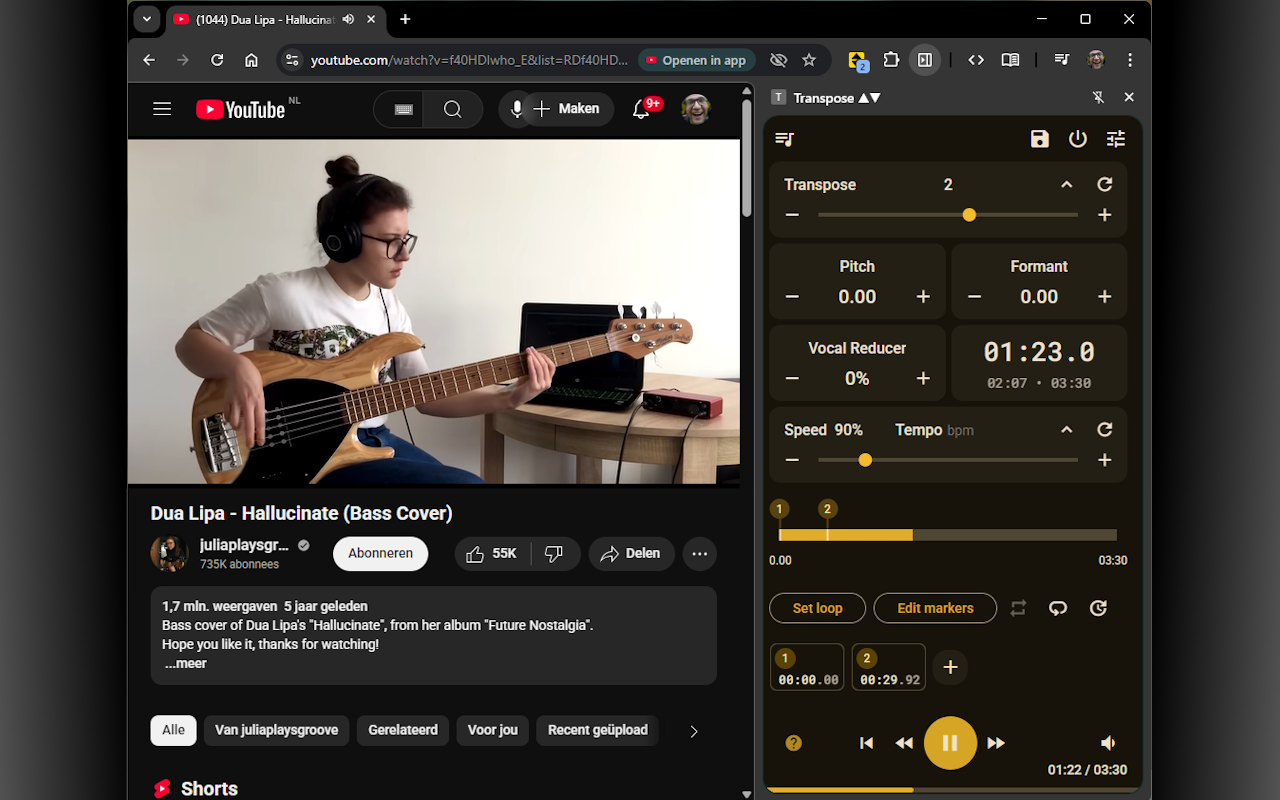
We’re excited to announce a major update to Transpose, bringing a redesigned experience to our free users and introducing Transpose Pro, a new tier for musicians who need the ultimate practice toolkit.
Transpose Classic: Better Than Ever (and Still Free)
The free version of Transpose, now called Classic, has been rebuilt from the ground up. It’s faster, more stable, and packed with new features, while remaining free forever.
Here’s what’s new in Classic:
- Redesigned Interface: The extension has a fresh new look, with completely overhauled Settings and History pages that are cleaner and easier to navigate.
- Auto-Save: You can now choose whether Transpose automatically saves your settings (pitch, speed, loops) for each video to the recent history.
- Remember Settings: A new option lets you start every session with your last-used settings for transpose, pitch, and speed.
- Improved Audio Engine: We’ve enhanced our audio processing for smoother playback with fewer artifacts.
- More Reliable Media Detection: We’ve significantly improved how Transpose finds audio and video on a page, reducing “No media detected” errors and fixing numerous bugs.
Introducing Transpose Pro
For users who want to take their practice to the next level, we’re launching Transpose Pro. It’s a premium upgrade that includes all the features of Classic, plus a suite of advanced tools designed for higher quality, more precision, and powerful workflows.
Here’s what Pro adds on top of Classic:
- Premium Pitch Shifter: Experience higher-quality, low-latency pitch shifting that delivers more natural sound with fewer clicks and artifacts.
- Advanced Audio Tools: Change vocal timbre without affecting pitch using Formant Control. Reduce the vocal parts or practice karaoke with the new Vocal Reducer
- Side-Panel UI with Timeline: Work in a persistent side-panel that’s always on top. Drag markers on a high-resolution timeline, scrub through audio while paused, and set perfect loops with millisecond accuracy.
- Clips & Sequences: Save song fragments as Clips, each with its own unique settings (pitch, speed, etc.). Then, chain them into a sequence to build custom practice routines, like gradually increasing the tempo.
- Cloud Sync: Save your clips, sequences, and settings to the cloud. Keep multiple versions of the same video.
- Workflow Enhancements: Speed up your process with custom keyboard shortcuts, and get quick access to a dedicated volume slider and power toggle.
Start your free Pro trial today
How to Get the Update
If you’re an existing user, your extension will update automatically. New users can install the latest version directly from the Chrome Web Store. Once installed, you can start your free trial of all Pro features with a single click.
We’re incredibly proud of this update and believe it makes Transpose a more powerful tool for every musician.