
How to change the pitch on Spotify (web player)
Learn how to shift the pitch of any Spotify track directly in your browser with the free Transpose extension.
Support
spotify pitch tutorial
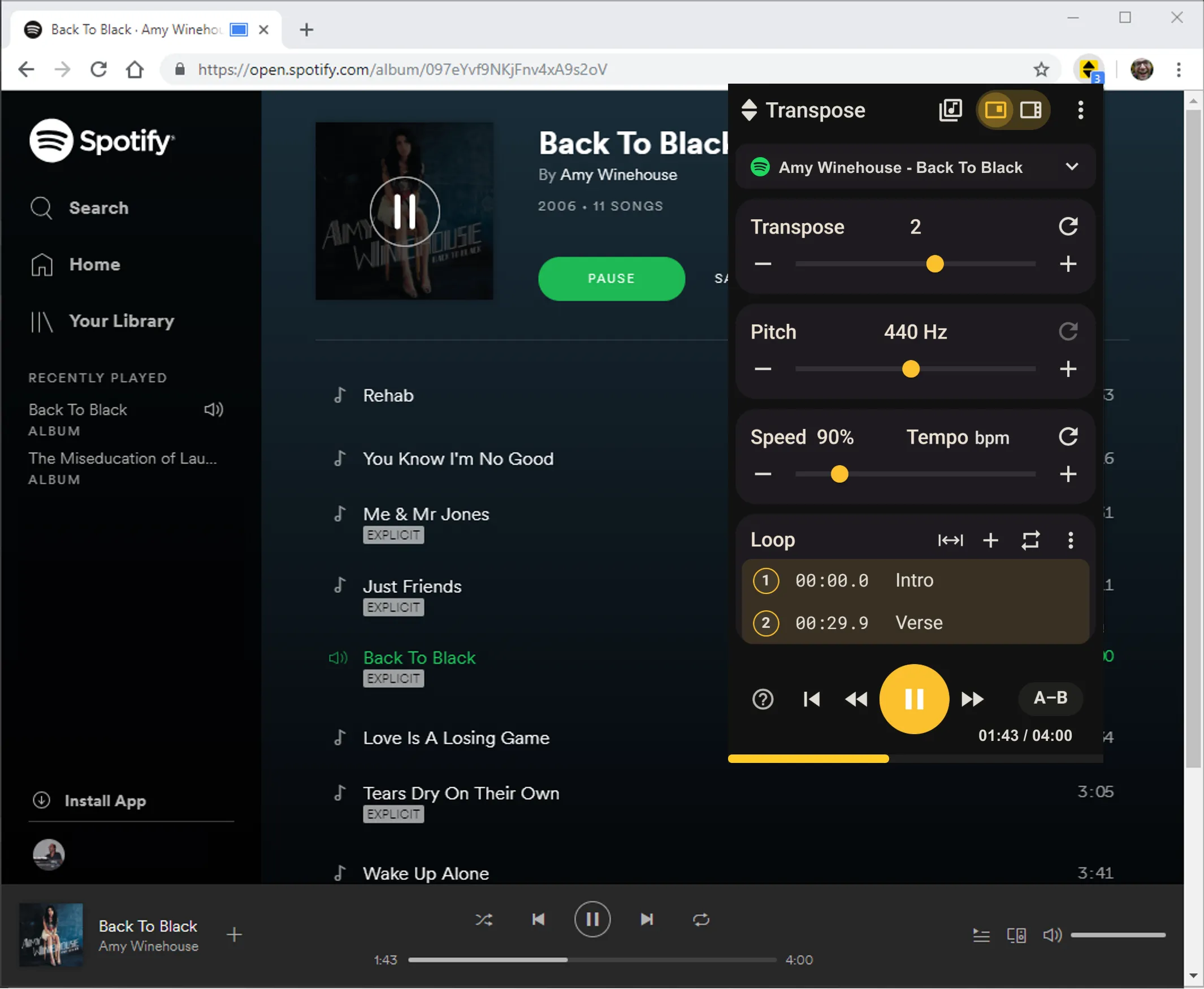
Keep listening in Spotify Web Player and open Transpose to change the key or repeat a passage. There is no audio file to obtain and import into another app first; you practise with the song that is already playing.
Why change pitch on Spotify
- Sing along with tracks in your own vocal range
- Practice instruments in multiple keys
- Explore songs in different tonalities for ear training or arrangement ideas
Open the song in Transpose
- Install Transpose (free) from the Chrome Web Store or Microsoft Edge Add-ons.
- Open Spotify Web Player in Chrome or Edge.
- Play any song and open the Transpose popup.
- Use the Transpose slider to transpose up or down (±12 semitones).
- Combine with speed and looping for deeper practice.
🎯 Works only in the browser (not the native Spotify desktop/mobile apps).
Quick tips
- Choose a key that fits your voice or instrument, then adjust by one semitone at a time.
- Loop smaller sections if you’re transposing for practice.
- Open the song in Studio and sign in to save its practice settings.
Conclusion
With the Transpose extension, you can change pitch on Spotify instantly in the web player. No downloads, no extra software — just open your browser and start practicing.