
Change Pitch on YouTube: Shift Any Video to Your Key
Shift the pitch of any YouTube video up or down to match your voice or instrument. Free browser extension — works instantly, no downloads needed.
Support
youtube pitch tutorial
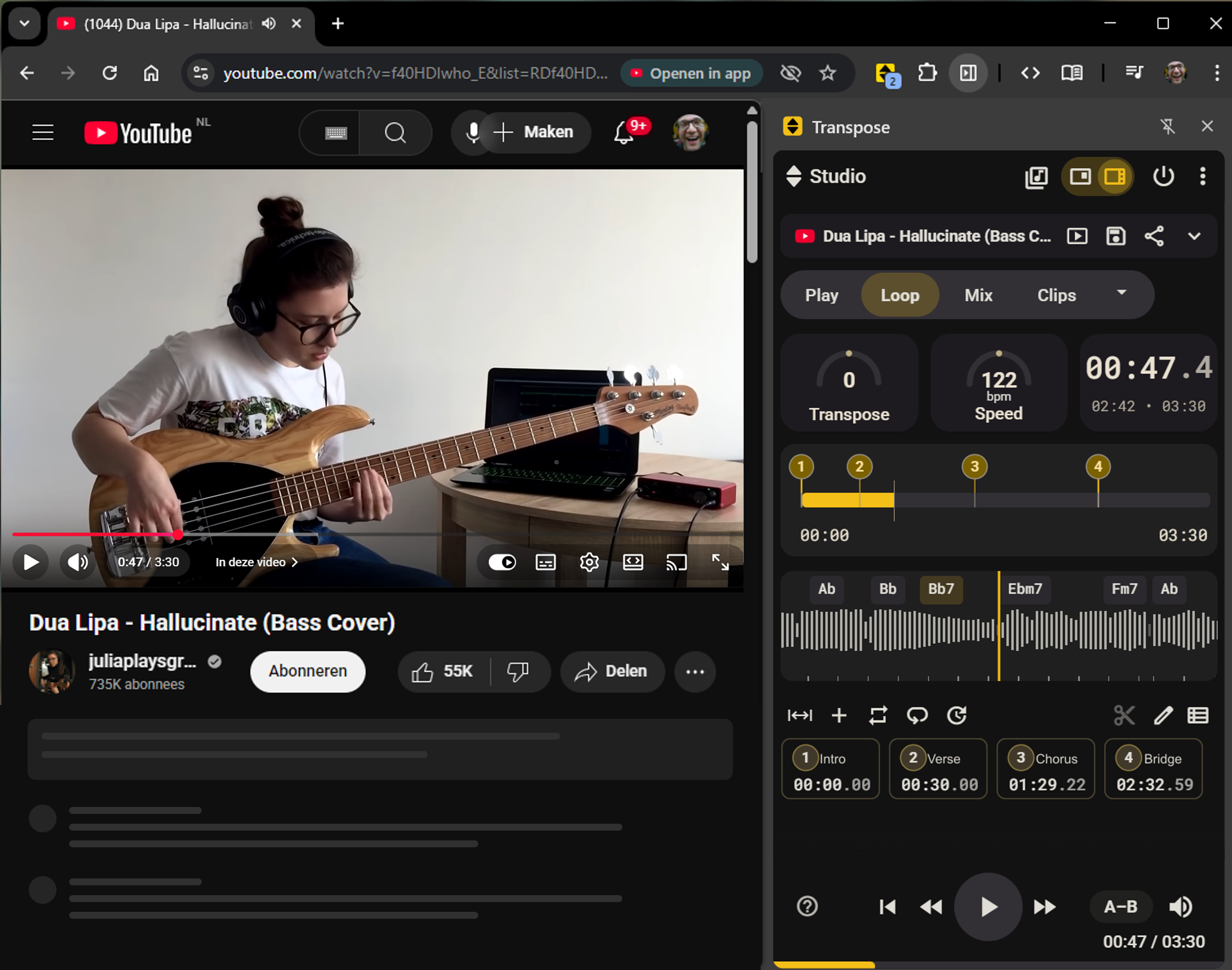
Already listening on YouTube? Open Transpose and change the key while the video plays. You do not need to download the audio, import it into a DAW or prepare a separate project to practise with it.
Why change the key of a YouTube song?
- Karaoke tracks often sit too high or low for your range.
- Musicians practice better when songs fit their instrument.
- Transposing helps ear training and flexibility.
Open the song in Transpose
- Install Transpose (free) from the Chrome Web Store or Microsoft Edge Add-ons.
- Open any YouTube video.
- Use the extension popup to shift pitch up or down (±12 semitones).
- Optional: Slow down or loop sections for practice.
🎯 Works instantly in the browser, no downloads needed.
Quick Tips
- Don’t over-shift: ±3 semitones usually keeps quality high.
- Combine pitch shift with loop practice for best results.
- Open the song in Studio and sign in to save your practice settings.
Conclusion
With a free tool like Transpose, you can sing and play along with any YouTube song in your key — no downloads, no hassle.