
Transposing music: change the key of any song with Transpose
Learn what transposing means and how you can easily change the key of any song with the free Transpose browser extension.
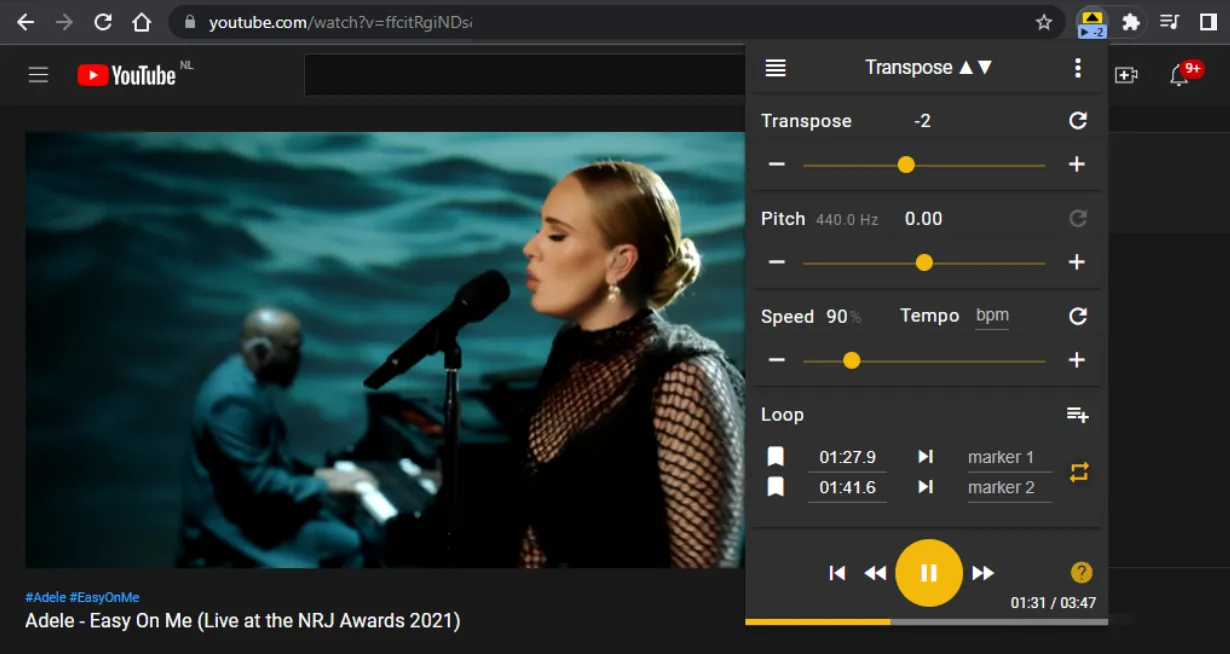
Imagine this: you find a great song on YouTube, grab your guitar, and realise the key just doesn’t sit right for your voice. Or you’re at the piano and want to play along with a recording that’s tuned a half step lower. In both cases the answer is the same: transposing. In this article we explain what transposition really means, why it’s so useful, and how the Transpose browser extension lets you shift any song to a different key in a few clicks.
What is transposing?
Transposing means shifting every note of a piece of music up or down by the same interval. The result is the same song, but in a different key. Shift a piece from C major up two semitones and it sounds in D major. All melodies, chords and intervals stay intact — only the absolute pitch changes.
In classical music theory you would rewrite every note on paper. That takes time and requires a solid knowledge of scales. Fortunately, that’s no longer necessary. With a digital pitch shifter you can shift the pitch of a recording in real time, without rewriting a single note.
Why transpose music?
There are many practical reasons to change the key of a song:
- Match your vocal range. Not every song fits your voice. By shifting a song a few semitones up or down you find the key that sits best in your range.
- Instrument tuning. Some guitarists tune a half step down. If you want to play along with a standard-tuned recording, you need to transpose so the chords line up.
- Playing together. Wind players in B♭ or E♭ regularly need to transpose to play alongside instruments in C. A quick pitch shift saves you from rewriting parts by hand.
- Learning and transcribing. A song in a difficult key (lots of sharps or flats) becomes more approachable when you temporarily move it to a simpler key. That way you can focus on the melody and rhythms instead of tricky accidentals.
How to transpose a song online
With the Transpose extension you change the key of audio and video right inside your browser. Here’s how:
- Install the extension. Transpose is free for Chrome, Edge and other Chromium browsers. After installing, a small icon appears in your toolbar.
- Open a supported platform. YouTube, Spotify, SoundCloud, Deezer, Apple Music — Transpose works anywhere audio plays in your browser.
- Adjust the pitch. Click the Transpose icon and shift the pitch in semitone steps. Want to move a song up two semitones? Set the value to +2. Done.
- Adjust the speed (optional). Besides transposition you can also change the playback speed — handy for practising a fast passage at a slower tempo.
- Loop a section. Want to repeat a specific part? Set a loop on the fragment you want to practise. With Pro you can even save multiple clips and sequences.
Everything runs live in your browser. No file uploads, no extra software beyond the extension.
Transposing for guitarists
As a guitarist you have two options when a song isn’t in a convenient key: use a capo or transpose digitally.
A capo is fantastic when you play acoustic and want to keep open-chord shapes. But a capo only works upward — you can’t go to a lower key with one. On top of that, a capo changes the string tension and feel, which affects your playing style.
With Transpose you shift the pitch of the recording instead of adjusting your instrument. That gives you more freedom:
- Play along in the original chord shapes while the recording is shifted to your key.
- Practise the same progression in different keys without moving your capo.
- Combine digital transposition with a capo for creative results.
Tip: If you want to learn a song that’s tuned a half step down (like many tracks by Jimi Hendrix or Stevie Ray Vaughan), set Transpose to +1 so the recording matches your standard tuning.
Transposing for singers
For singers the right key is the difference between comfortable singing and straining your voice. Not every song was written for your range, and that’s perfectly normal.
Here’s how to find the ideal key with Transpose:
- Play the song and sing along.
- Shift the pitch one semitone at a time until the hardest passages — the highest or lowest notes — sit comfortably.
- Note the value (for example −3 semitones) so you can set it instantly next time.
This is especially useful for choir members learning parts, singers preparing a song for a performance, or singer-songwriters experimenting with different keys for their compositions.
With Transpose Pro you can also adjust formant. This keeps the vocal timbre natural even when you shift the pitch several semitones. That way a transposed song doesn’t sound like a sped-up or slowed-down recording, but like a natural performance in a different key.
Transposing as a practice method
Transposing isn’t just a tool for playing along — it’s also a powerful practice method.
- Ear training. Practise the same song in multiple keys. This trains your ear and helps you recognise intervals and chord progressions regardless of key.
- Technical skill. Guitarists and pianists who play a piece in different keys broaden their knowledge of the fretboard or keyboard.
- Slow practice. Combine transposition with a lower playback speed to master difficult passages step by step. The loop function lets you repeat tricky sections automatically.
- Improvisation. By transposing backing tracks you practise improvising in unfamiliar keys — essential for jam sessions.
This approach works for any instrument and any level. Whether you’re learning your first chords or transcribing jazz solos, transposing online with Transpose makes practice more efficient and more fun.
Frequently asked questions
Is transposing the same as a pitch shift? In essence, yes. Transposition is the music-theory term for moving a piece to a different key. A pitch shift is the technical operation that makes it possible in audio. Transpose combines both: you choose a number of semitones, and the extension adjusts the audio in real time.
Does Transpose work with video too? Yes. Transpose works with any audio or video source playing in your browser, including YouTube videos, Spotify streams and more.
Is Transpose free? The core features — transposition, speed and a simple loop — are completely free. Transpose Pro adds features like formant control, multiple clips, sequences and saved songs.
Install the free Transpose extension and change the key of any song in your browser — in just a few seconds.