
Getting Started with Transpose: A Beginner's Guide
A complete walkthrough of everything Transpose can do — from installing the extension to pitch shifting, looping, clips, and Pro features like formant control and vocal reducer.
Transpose is a free browser extension that turns any song playing in your browser into a practice tool. Change the key, slow the tempo, loop a section — all in real time, without uploading files or leaving the page. This guide walks you through everything you need to know, from installation to advanced Pro features.
Install the extension
- Go to the Chrome Web Store.
- Click Add to Chrome — the extension installs in seconds.
- Click the puzzle-piece icon (Extensions) in the toolbar and pin Transpose so the ▲▼ icon stays visible.
Transpose works in Chrome, Edge, and most Chromium-based browsers (Brave, Opera, Vivaldi). Pro features are available only in Google Chrome on desktop.
Open a song and connect
- Navigate to a supported platform — YouTube, Spotify (web player), SoundCloud, Deezer, Apple Music, or any site that plays audio in your browser.
- Start playback first, then click the Transpose icon.
- The extension detects the media and connects automatically.
Tip: If you see a “No media” message, make sure the song is actually playing. Some sites need an extra permission — click Allow access when prompted and approve the browser dialog.
The main interface
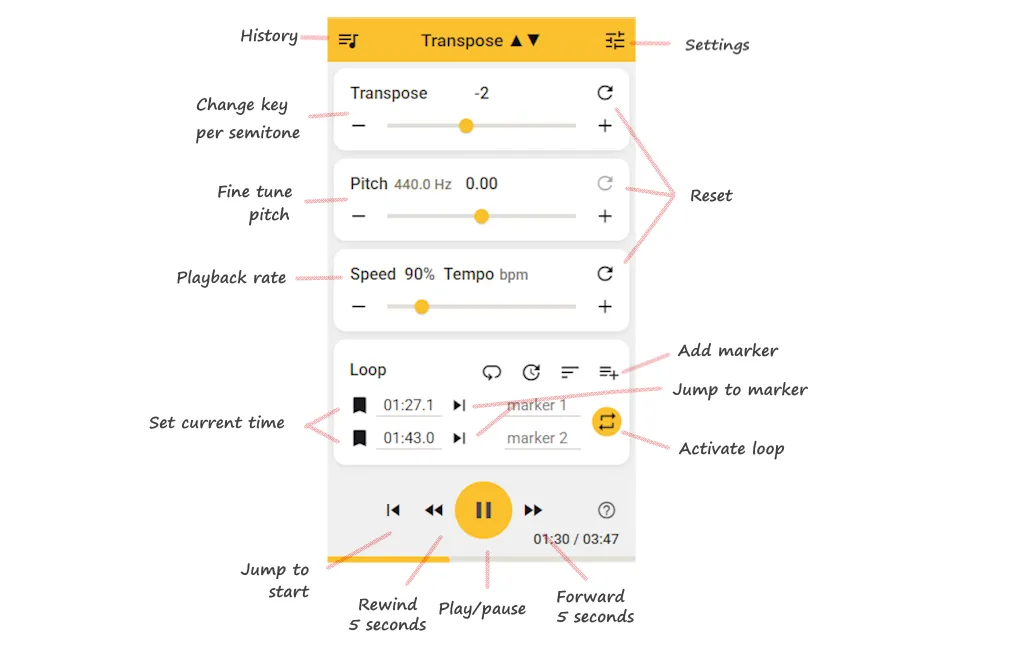
Once connected, the Transpose popup shows all your controls in a compact layout. Here’s what each section does:
Top bar
- History (left) — access your recently played songs and saved settings.
- Settings (right) — open preferences, Tab audio mode, data & reset, and more.
Transpose
- Shift the key of the song up or down in semitone steps. The − and + buttons move by one semitone; drag the slider for quick jumps. Click the reset arrow to return to 0.
Pitch (fine-tune)
- Adjust pitch in fractions of a semitone. The display shows the current frequency (e.g. 440.0 Hz) and the fine-tune offset. Use this when a recording is slightly sharp or flat and you need a precise correction.
Speed / Tempo
- Change the playback rate as a percentage (e.g. 90 % to slow down). The Tempo bpm display gives you an estimated beats-per-minute reading. Pitch and speed are independent — changing one does not affect the other.
Loop
- Set current time — click the bookmark icon to save the current playback position as a marker.
- Jump to marker — skip playback to a saved marker instantly.
- Activate loop — once you have two markers, tap the repeat icon to repeat that section automatically.
- Add marker — create additional markers for more complex practice ranges.
Transport controls (bottom)
- Jump to start — return to the beginning of the track.
- Rewind / Forward 5 seconds — nudge playback in either direction.
- Play / Pause — the large centre button.
- The time display shows your current position and total duration.
Change the pitch
The Transpose slider is the core feature. You hear the exact same song, at the same tempo, but in a different key.
- The default range is ±12 semitones (one full octave). Enable Extended Range in Settings to go up to ±36 semitones — three octaves in either direction.
- The Pitch fine-tune knob handles adjustments smaller than a semitone — useful when a live recording is slightly off standard tuning.
Perfect for singing along in your range or matching your instrument’s tuning.
Change the speed
The Speed panel controls playback tempo from 25 % to 400 %.
- Slowing a passage down to 60–80 % is ideal for learning difficult sections note by note.
- Speeding up helps build fluency once you know the part.
- Pitch and speed stay independent — changing one does not affect the other.
Combine a pitch shift with a speed change and you have a complete practice workstation for any song.
Loop a section
Looping lets you repeat a fragment automatically so you can drill it until it sticks.
Free version loops
- Click the bookmark icon to place a marker at the current time.
- Add a second marker to define a range, then click the repeat icon to loop that section.
- Use the wait-in count to insert a brief pause before each repeat — useful for counting yourself in.
Pro advanced loops
- Place as many markers as you need along the timeline.
- Click the Range button , then tap two markers to define the loop.
- Drag markers on the timeline to adjust positions visually.
- Click anywhere on the timeline to jump; when paused, you get a short scrub preview.
- Long-press a marker to edit its label, fine-tune its time, or sync it to the current playback position .
Clips and sequences (Pro)
Clips take looping a step further. A clip is a saved time range with its own pitch, speed, formant, and vocal reducer settings.
- Select a range with two markers.
- Click the scissors icon to save it as a clip.
- Inside the clip, add parameters — for example, set this fragment to 70 % speed and +2 semitones.
- Duplicate the clip from the More menu and change the speed to 85 %, then again at 100 %. Now you have a sequence that gradually increases tempo.
Press Play on the first clip and the sequence runs automatically. You can insert wait counts between clips, reorder them by dragging , or toggle individual clips on and off. It’s a structured way to build a practice routine without resetting controls by hand.
Formant control (Pro)
When you shift pitch more than a few semitones, voices can start to sound unnatural — chipmunk-like when raised, or unnaturally deep when lowered. Formant control adjusts the timbre (vocal colour) independently of pitch, keeping the voice sounding natural even at large transpositions.
This is especially useful for singers who need to practise in a very different key and want the backing vocals to still sound realistic.
Vocal reducer (Pro)
The Vocal Reducer uses mid-side processing to isolate and lower the centre channel of a stereo mix, where lead vocals typically sit.
- Depth controls how much reduction is applied (0–100 %).
- Vocal Cut crossfades between multi-band notch filtering (cleaner) and phase cancellation (more aggressive).
- Center Focus shifts the stereo target if vocals are not perfectly centred.
- Low Cut / High Cut pre-filters clean up rumble and hiss before processing.
Results vary by mix, but on many tracks you get a usable karaoke-style backing track — great for singing practice or learning harmonies.
Varispeed (Pro)
Varispeed links pitch and speed together, exactly like a tape deck or vinyl turntable. Speeding up raises the pitch; slowing down lowers it. No time-stretch processing is applied, which means zero stretching artifacts and the highest possible audio quality.
The trade-off is a small range (roughly ±2 semitones). Use Varispeed when you need a slight pitch correction — for example, matching a live recording that’s a quarter-tone sharp — and want pristine sound.
Reference tuning (Pro)
Some recordings use a pitch standard other than the modern A = 440 Hz. Baroque ensembles tune to 415 Hz, some artists prefer 432 Hz, and many live recordings drift slightly.
Enable Reference Tuning in Settings → Audio engine options. Set the Track tuning (what the recording uses) and Instrument tuning (what your instrument is tuned to). Transpose calculates the difference automatically, so your semitone steps stay musically accurate against both.
Built-in presets include Baroque (415 Hz), Classical (430 Hz), Earth frequency (432 Hz), Modern (440 Hz), and Chorton (465 Hz), among others.
Tab audio mode
Some sites use protected or non-standard audio routing that prevents direct connection. When that happens, Transpose offers Tab audio mode as a fallback.
- Click the icon in the panel, or go to Settings → Tab audio mode.
- Approve the browser capture prompt.
- All audio on the tab gets pitch and speed control.
Playback controls (play, loop, markers) often continue working via the direct connection — only the pitch processing routes through tab capture.
Save your work (Pro)
Pro syncs your data to the cloud via Google Sign-In:
- Saved songs — store a track with all its settings (pitch, speed, clips, sequences) so you can resume next session.
- Playlists — organise saved songs into lists.
- Auto Save — every time you change controls on a new track, the settings are saved to Recent history automatically.
- Cloud sync — everything syncs across your signed-in Chrome browsers.
Side panel (Pro)
The popup closes when you click away. The side panel stays open next to the page — ideal when you need to adjust controls while playing.
Click Open in Side Panel from the popup, or configure it to open automatically. The side panel gives you full access to the timeline, clips, sequences, and all Pro controls without interrupting your workflow.
Keyboard shortcuts (Pro)
Pro users can configure custom keyboard shortcuts directly in Transpose’s Settings → Keyboard shortcuts → Custom shortcuts. Assign keys to actions like pitch up/down, speed up/down, toggle loop, play/pause, and more — so you can control everything without clicking while you play your instrument.
Troubleshooting
- No media: Refresh the page, start playback first, then open the extension.
- Allow access: Click the button and approve the browser permission.
- Disconnected: Click the Transpose icon in the toolbar to re-inject on the current page.
- For detailed fixes, see the FAQ.
What’s free vs. Pro
| Feature | Classic (Free) | Pro |
|---|---|---|
| Pitch shift (±12 or ±36 semitones) | ✓ | ✓ |
| Speed control (25–400 %) | ✓ | ✓ |
| Basic loops and markers | ✓ | ✓ |
| Works on YouTube, Spotify, SoundCloud, etc. | ✓ | ✓ |
| Premium low-latency pitch engine | — | ✓ |
| Formant control | — | ✓ |
| Vocal reducer | — | ✓ |
| Advanced looping, clips, sequences | — | ✓ |
| Varispeed | — | ✓ |
| Reference tuning | — | ✓ |
| Side panel | — | ✓ |
| Cloud save and sync | — | ✓ |
Classic is free forever — no account required, no ads. Pro is an optional upgrade for musicians who want better sound quality, less delay, and advanced practice tools. You can try everything with a free 7-day Pro Trial.
Install the free Transpose extension and start practising any song in your key, at your pace.