
How to change the pitch on Spotify (web player)
Learn how to shift the pitch of any Spotify track directly in your browser with the free Transpose extension.
Support
spotify pitch tutorial
Why change pitch on Spotify
- Sing along with tracks in your own vocal range
- Practice instruments in multiple keys
- Explore songs in different tonalities for ear training or arrangement ideas
Option 1: Use the Transpose Browser Extension
- Install Transpose (free) from the Chrome Web Store.
- Open Spotify Web Player in Chrome or Edge.
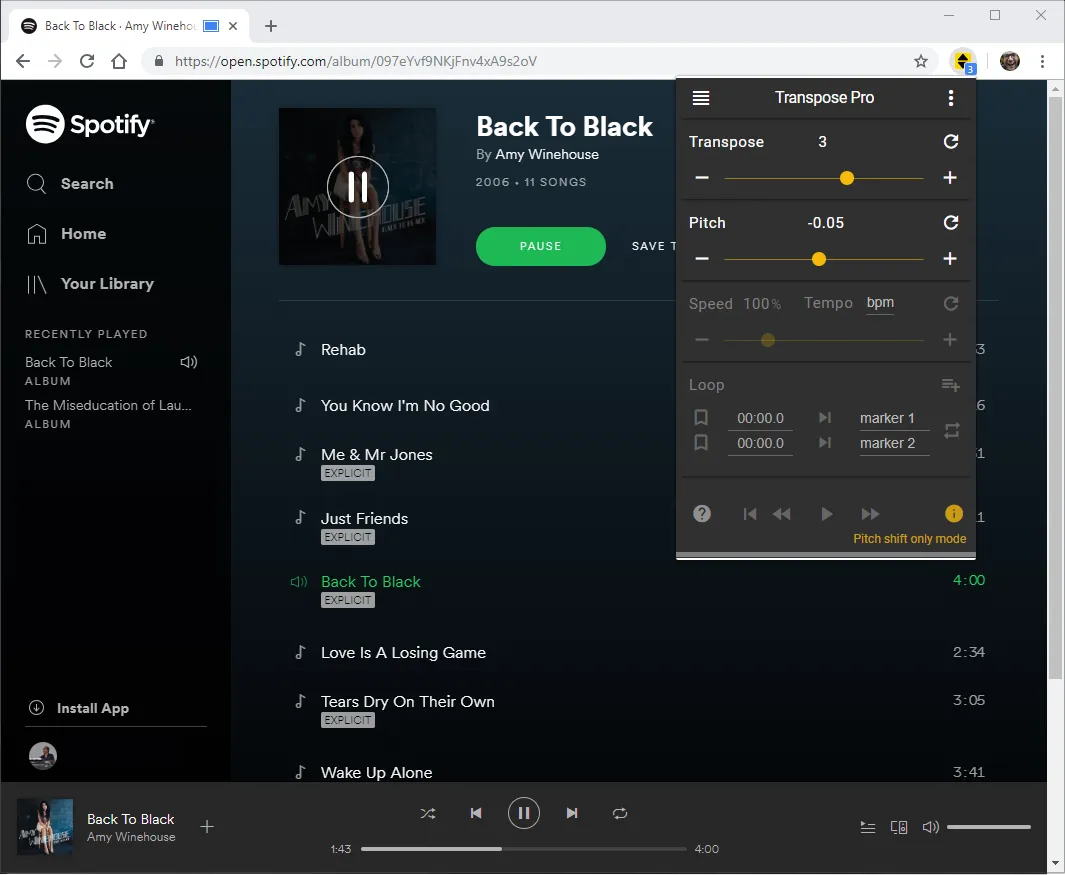
- Play any song and open the Transpose popup.
- Use the Pitch slider to transpose up or down (±12 semitones).
- Combine with speed and looping for deeper practice.
🎯 Works only in the browser (not the native Spotify desktop/mobile apps).
Option 2: Alternative methods
- Desktop audio editors (Audacity, Logic, Ableton) — require downloading and editing.
- Mobile karaoke apps — usually limited and paid.
- Why browser extensions are faster: instant, no files, free.
Quick tips
- For natural sound quality, stay within ±3 semitones.
- Loop smaller sections if you’re transposing for practice.
- Pro users can save presets per track for faster recall.
Conclusion
With the Transpose extension, you can change pitch on Spotify instantly in the web player. No downloads, no extra software — just open your browser and start practicing.