
Reference Pitch Tuning – Play Along in Any Tuning Standard
Match a recording to your instrument with separate reference frequencies. Learn when to use cents, semitone transposition or Reference Tuning in Studio.

A recording can be slightly sharp or flat relative to your instrument even when you are playing the right notes. Reference Tuning lets you specify the recording’s tuning and your instrument’s tuning separately, so you can play along without retuning your instrument.
Reference pitch and transposition
A reference such as A = 440 Hz describes the frequency used for the note A. It is different from choosing a song’s key or tuning a guitar down a semitone.
- Use Transpose for whole-semitone changes. To play an E-flat-tuned guitar recording using the same fingerings on a standard-tuned guitar, raise the recording by +1 semitone.
- Use Pitch for small adjustments in cents. One semitone equals 100 cents.
- Use Reference Tuning when you know the recording and instrument reference frequencies, such as 430 Hz and 440 Hz.
StudioSide
Match the recording to your instrument
Reference Tuning is part of Studio’s expanded Pitch control in Side.
- Open your song in Studio and switch to Side.
- Expand the Pitch card to show its controls.
- Set Track to the recording’s reference frequency.
- Set Instrument to your instrument’s reference frequency.
- Play along and check the tuning against a sustained note.
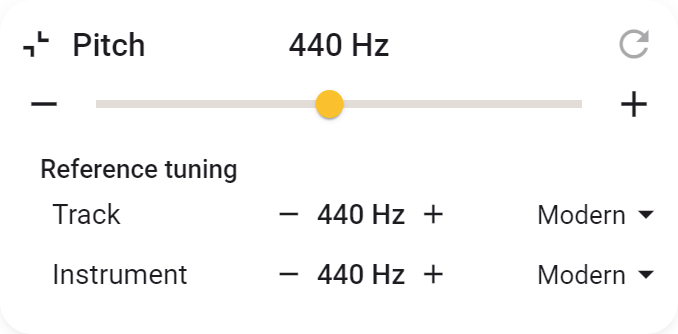
For example, if a recording uses A = 430 Hz and your instrument uses A = 440 Hz, Transpose raises the recording by approximately 40 cents. The correction is smaller than a semitone, so rounding it to a whole step would leave you out of tune.
You can enter frequencies or choose a preset. See Pitch and Reference Tuning for the controls and reset behaviour.
When the recording’s tuning is unknown
Keep your instrument at its normal tuning and compare a clear, sustained note with the recording. Adjust Pitch in small increments until the notes agree. Avoid guessing a reference value from the song title or an artist’s usual guitar tuning: a particular recording may differ.
If the recording is 15 cents sharp, a Pitch adjustment of −15 cents brings it down to your instrument. Transposition can still be used separately when you also need a different key.
Why recordings can differ
Musicians may deliberately use a reference other than 440 Hz. Historical-performance recordings, orchestral recordings and some backing tracks can therefore need a tuning correction.
Playback speed also affects pitch. An analogue recording transferred at a different tape or turntable speed can end up sharp or flat. A one-percent speed increase raises pitch by about 17 cents. Different versions of a recording need not have exactly the same tuning.
A constant correction works when the recording has a consistent offset. It cannot fix instruments that are out of tune with each other or pitch that drifts throughout the performance.
Reference Tuning and Varispeed
Normally, you can correct pitch while retaining the recording’s playback speed. Varispeed links them: raising pitch also speeds up the music, and lowering pitch slows it down.
Use normal Pitch when maintaining the tempo matters. Consider Varispeed for a small correction when a corresponding speed change is acceptable.
Using Studio
You can use Studio for three songs of your choice, without an account, subscription or expiry date. Open a song and choose Open in Studio. The Studio guide explains choosing and replacing songs and the options for unlimited Studio.