
Fine-tune a recording to match your instrument. Use cents for small adjustments: 100 cents equals one semitone.

- Reset returns Pitch to 0 and both reference values to 440 Hz.
Studio
- Turn on Mouse wheel control in Settings and scroll over the slider to fine-tune the pitch.
- Indicates that Pitch and Speed are linked through Varispeed.
StudioSide

- Gauge: press and hold it, then drag to change the value.
- Move the pointer over the card and click Expand to show all controls.
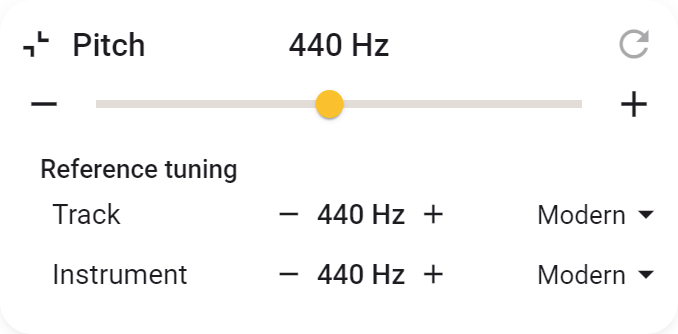
- Reference Tuning matches the recording and your instrument in 1 Hz steps or with a preset.
- Move the pointer over the card and click Collapse to return to the small card.